Research
SZNSeasonality Analysis
How the panel builds a seasonal pattern: the averaged calendar-year curve, a draggable trade window, the win-rate / return / risk stat board explained field by field, the per-year table, and the Events and Intramonth modes.
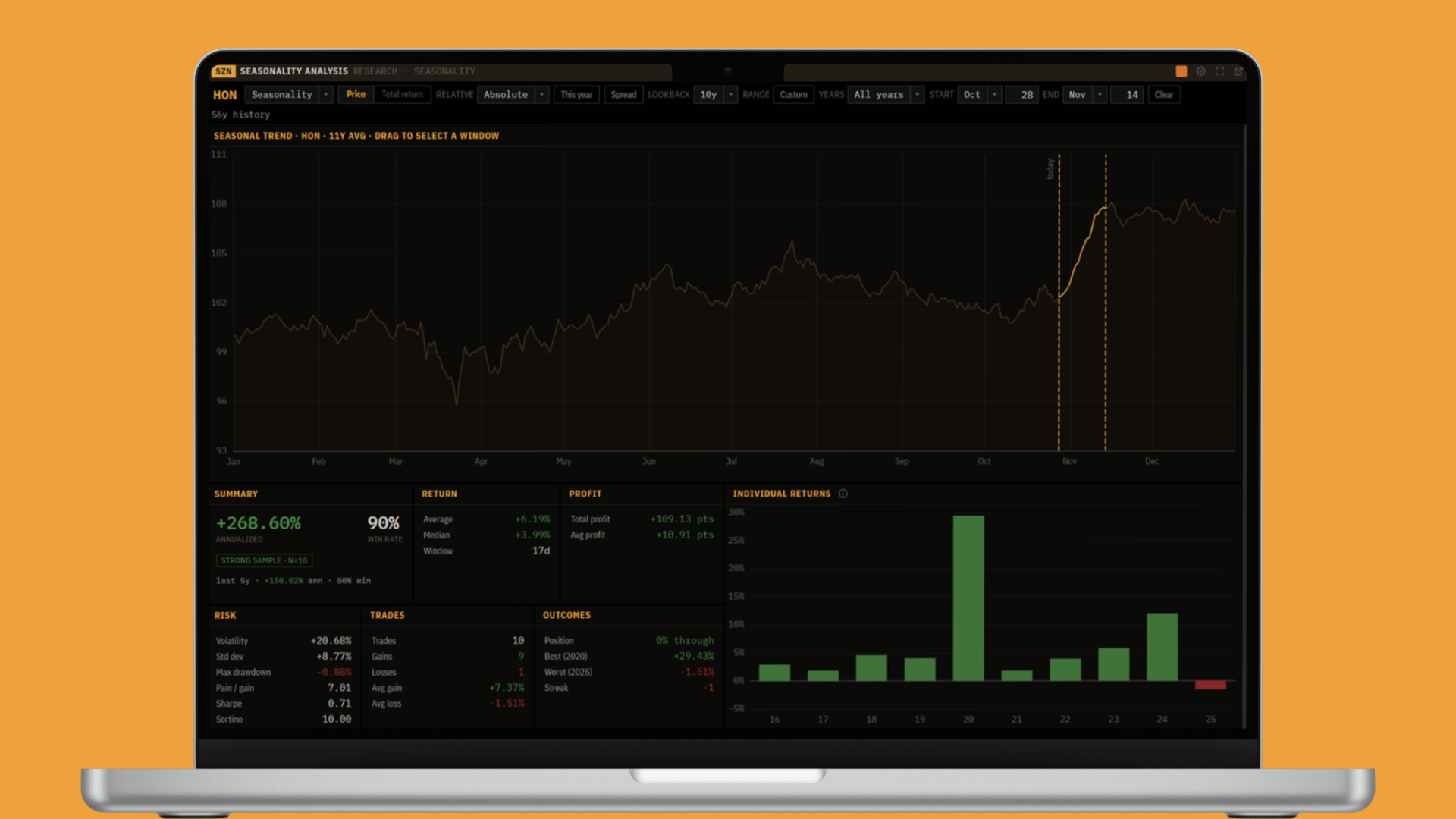
Prices have a calendar. Some weeks of the year an instrument tends to rise, others it tends to fall, and over enough years that tendency shows up as a shape. This panel finds that shape. It averages many years of one instrument onto a single calendar, lets you pick any window on it, and then tells you, in plain numbers, how a trade that bought at the start of that window and sold at the end would have done every year: how often it worked, how much it made, how bumpy the ride was, and whether the edge is still alive. The same engine also rebases to a recurring event (an election, a Fed decision) or to the day-of-month cycle, so "what does the calendar say?" is one panel, not three.
Why this panel exists
A seasonal pattern is easy to assert and hard to trust. "This stock is strong in November" is worth nothing until you know across how many years, how often it actually finished up, how big the misses were, and whether the last five years still look like the last fifteen. This panel is built to answer exactly those questions. You point it at a symbol, draw a window, and it runs the same trade over every year in the sample at once, then lays the result out as a curve, a stat board, four charts, and a year-by-year table. The point is not to find a pattern, patterns are everywhere in noise, it is to measure one well enough to decide whether to act on it.
Note: This is end-of-day history, not a live feed. Seasonality is a statement about where price tends to go over days and weeks, built from daily closes. Read it as the calendar's base rate, not a signal for the next tick.
The filter bar
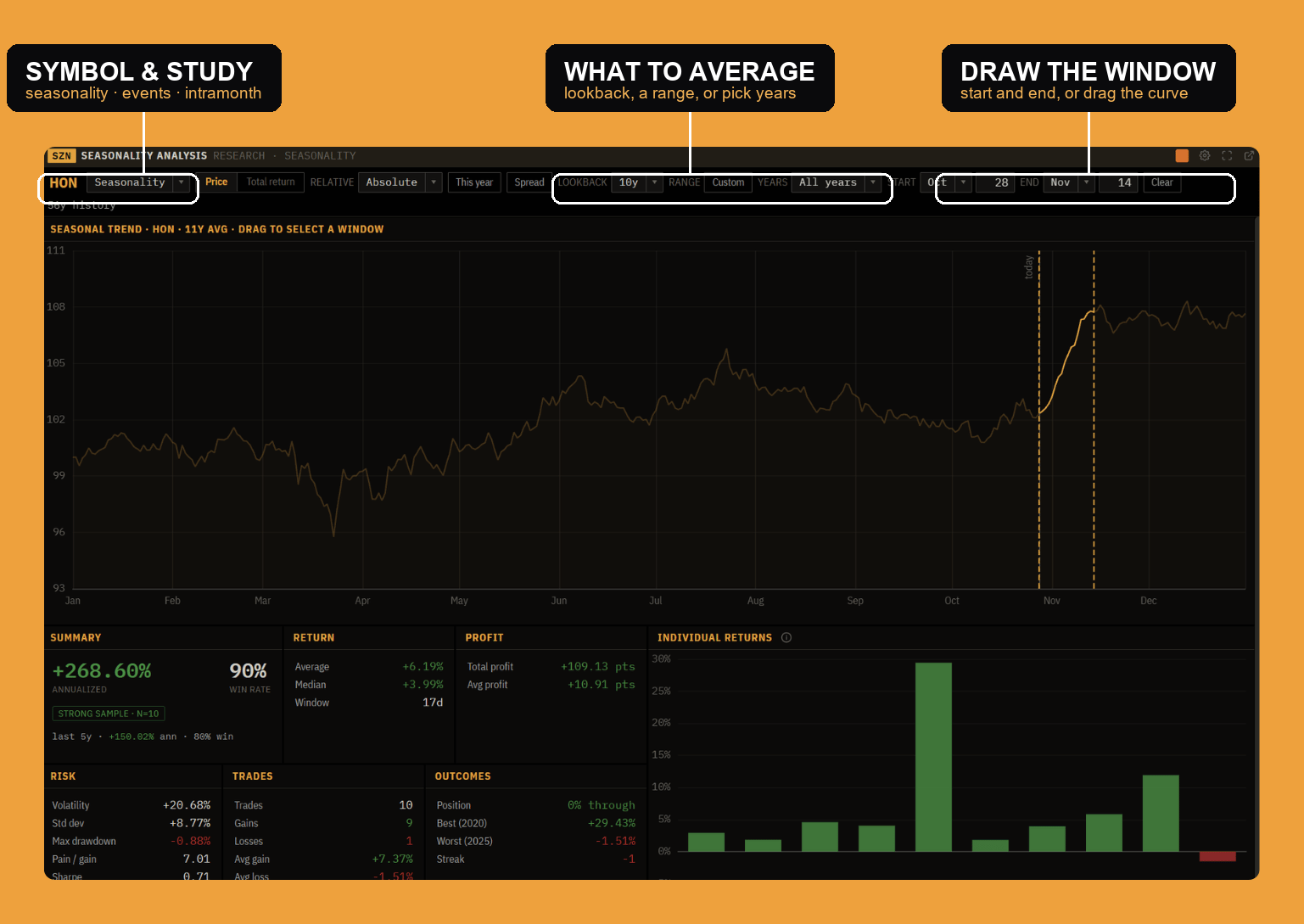
The row along the top is where you shape the study, so it is the place to start. Left to right:
- Ticker: click it to search and load any symbol. The study follows a linked symbol group too.
- Analysis mode: Seasonality (the calendar-year cycle), Events (rebased to a recurring event), or Intramonth (the month cycle). Same layout, different anchor; the two other modes have their own sections below.
- Price basis: Price or Total return. Total return folds dividends back in, so the pattern reflects what a holder actually earned. For a dividend payer it is the more honest basis; for a non-payer the two are identical.
- Relative (seasonality mode): Absolute, or vs SPY / QQQ / IWM. Relative runs the whole study on the stock-divided-by-benchmark ratio, so the curve shows the stock's excess seasonal pattern, how it tends to move against the market, not alongside it. When relative is on, Beta appears in the Risk card as the leverage caveat.
- This year: overlays the current year's actual path on top of the average curve, so you can see whether this year is tracking, leading or lagging the seasonal norm.
- Spread: shades the 20th-to-80th-percentile band of the individual years around the average, plus faint per-year lines. It turns the single average line into a cloud, so you see the dispersion, not just the mean.
- Lookback: how many complete years to average (5, 7, 10, 15, 20, 25, 30, or All). Fewer years is more responsive to the recent regime; more years is more reliable but can average across a changed company.
- Range: a custom date range in place of the lookback preset, when you want an exact span of years.
- Years: include or exclude individual years by hand. This is the same set the per-year tick boxes drive.
The seasonal curve
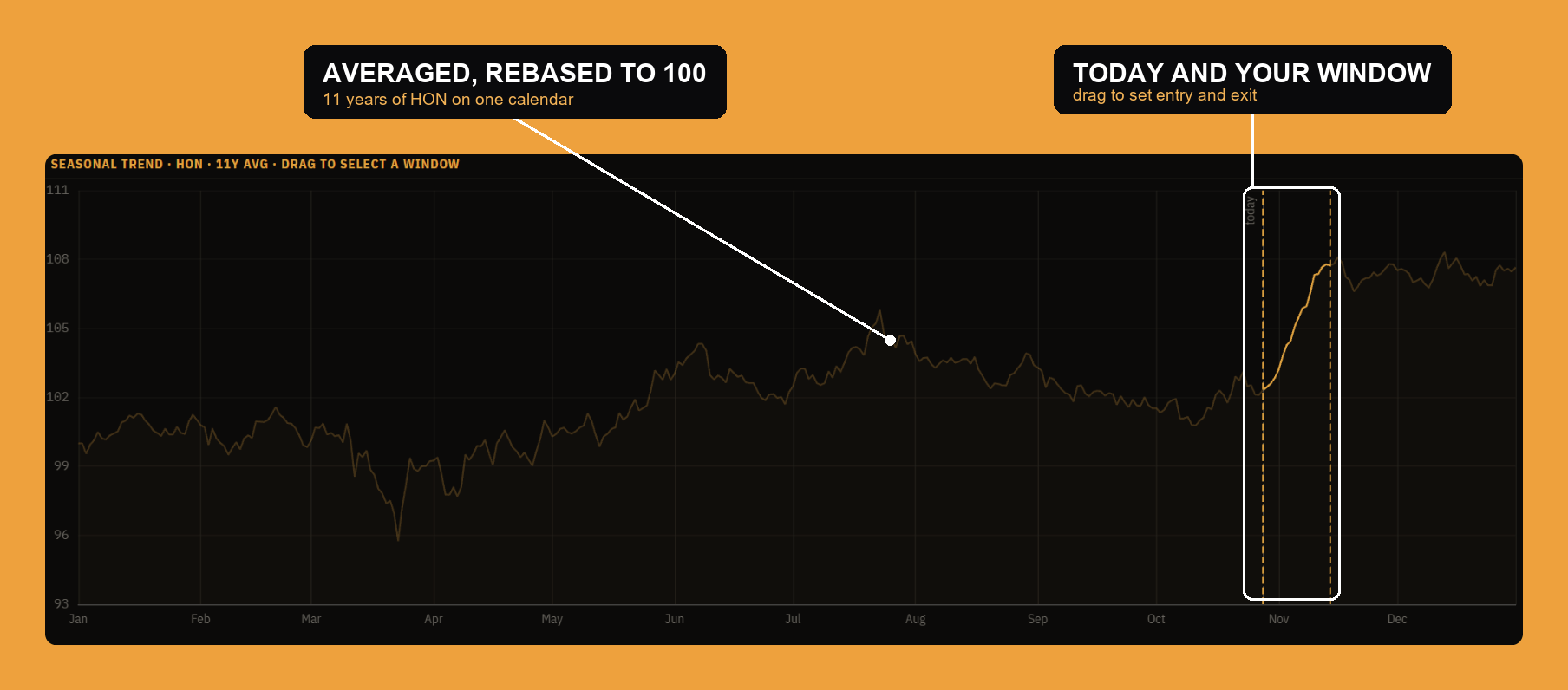
The curve at the top is the whole study in one line. It is built the same way every time:
- Each year is rebased to 100 at that year's first trading day, so a $40 year and a $400 year contribute the same shape and price level cancels out.
- Every year's path is laid onto a shared 365-day calendar (Feb 29 folds onto Feb 28) and forward-filled across weekends and holidays, so the same calendar position lines up across all the years.
- The line you see is the geometric (log) average of those rebased paths at each calendar day. Geometric, not a plain average, so one explosive year cannot drag the back half of the curve up on its own.
The title reads "Seasonal trend · HON · 11y avg." That 11y avg is how many years went into the curve. You will often see one more year on the curve than in the trade sample below it: the current, still-unfinished year is drawn for context but is not counted as a completed trade, so the curve can say 11 years while the stats say 10. The dashed "today" line marks today's position on the calendar, and the "56y history" readout in the filter bar is how many complete years of data exist for the symbol. Drag across the curve to select a window; everything below updates to that window.
Selecting a window
The window is the trade. Drag a span on the curve, or type a Start and End (month and day) in the filter bar, and the panel runs that trade over every sampled year:
- For each year, entry is the first session on or after the start date and exit is the first session on or after the end date. Both snap forward, so a weekend or holiday start lands on the next open session. A window that runs into year-end with no later session falls back to that year's last session.
- That is one trade per year: buy at entry, sell at exit. The stat board, the per-year table, the individual-returns bars and the cumulative-profit line are all computed over that window.
Clear removes the window and the stats go quiet until you draw a new one.
The stat board
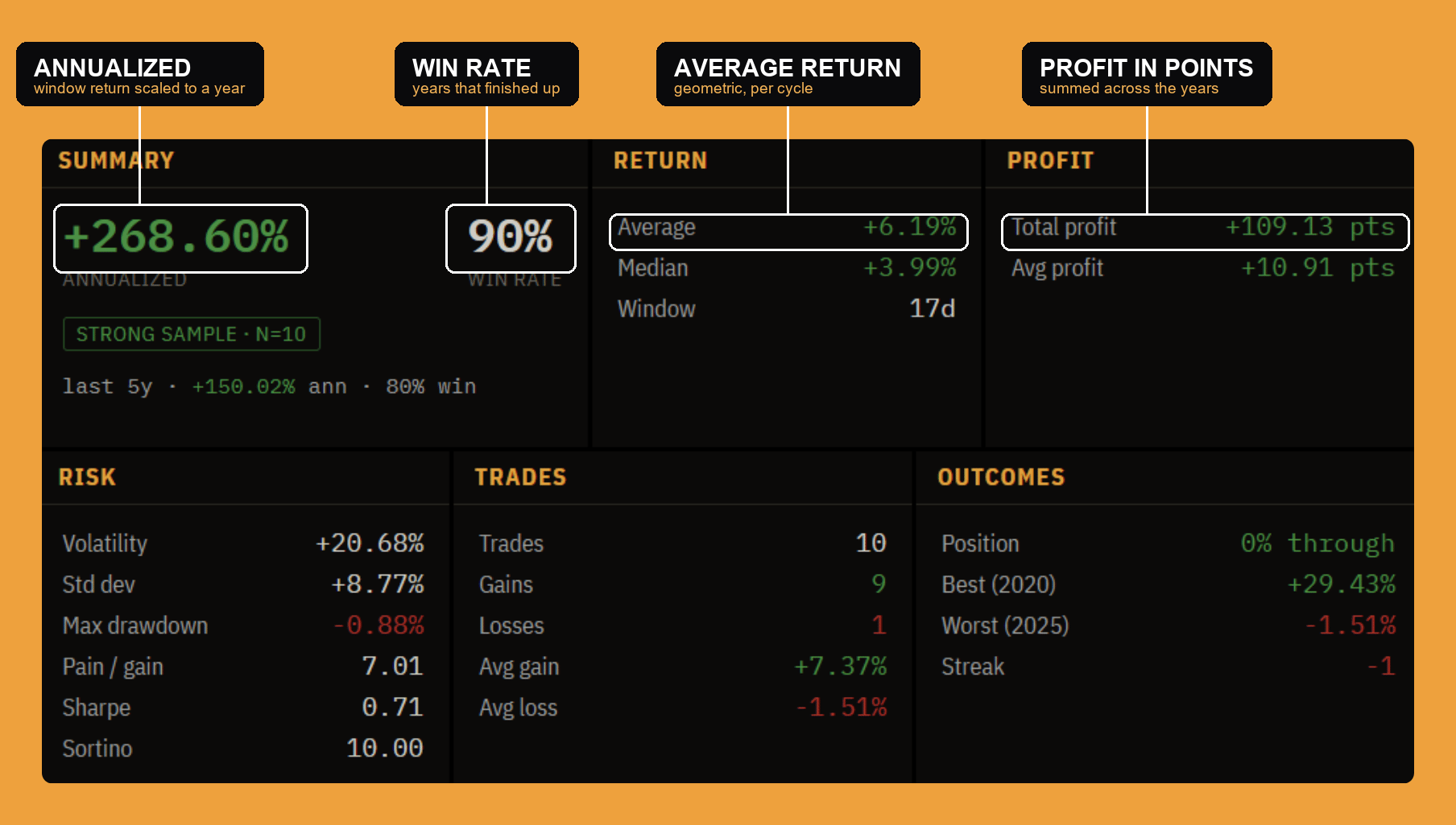
Six cards read out the selected window from six angles. This is the heart of the panel, so here is every field and exactly what it measures.
Summary
- Annualized is the headline number. It takes the window's average return and compounds it up to a full year, using the average real length of the hold. A 17-day window and a three-month window are not comparable as raw returns, so both are scaled to a per-year rate here. (A +6% average over a 17-day hold annualizes to a large number precisely because it repeats so many times in a year, it is a rate, not a promise of that gain.)
- Win rate is the share of the sampled years the trade finished positive (exit above entry).
- The sample chip under them grades reliability by how many years back the pattern: strong at 10 years or more, moderate at 6 to 9, thin below 6. A seasonal edge measured over three years is a coincidence waiting to happen; the chip is there to keep you honest.
- The last 5y line runs the identical window over just the five most-recent sampled years and shows its annualized return and win rate. It is the decay check: if the full history looks great but the last five years are flat, the edge may already be gone. (Shown whenever more than five years are in the sample.)
Return
- Average is the geometric (compounded) average of the window's return across the sampled years. Geometric, so it is the return you would actually have compounded by taking the trade every year, not the arithmetic mean that flatters a volatile series.
- Median is the middle year's return: half the years did better, half worse. When the average and the median are far apart, one or two outlier years are doing the work, and the median is the more honest "typical year."
- Window is the length of the selected window in calendar days.
Profit
- Total profit is the sum, across the sampled years, of each year's price change over the window (exit price minus entry price), in the instrument's own price points. It is the raw points a single share would have banked taking this trade every year in the sample.
- Avg profit is that total divided by the number of years: the average points per cycle.
Trades
- Trades is the number of years sampled, one trade per year (enter at the window start, exit at the end).
- Gains and Losses are how many of those years finished up and down.
- Avg gain is the average return across just the winning years; Avg loss, across just the losing years. Together they show the shape of the payoff, a pattern that wins small and often but loses big is a different animal from one that wins big and rarely.
Risk
- Volatility is the annualized day-to-day volatility inside the window, how bumpy the hold is while you are in it. It is built from the daily moves within each cycle, averaged across cycles, and scaled up by the square root of 252 trading days. It recomputes for whatever window you select.
- Std dev is the year-to-year spread of the window's return: how consistent the pattern is from one year to the next (the sample standard deviation of the per-year returns). Low Std dev with a positive average is the ideal, a quiet, repeatable edge.
- Max drawdown is the average of each year's worst dip below the entry price during the hold. It is an average across the sampled years, not the single worst moment ever, so it reads as "the typical heat you take" on this trade.
- Pain / gain is the average return divided by the average drawdown: reward earned per unit of pain. Higher is better.
- Sharpe is the window's average return divided by its year-to-year Std dev (the card directly above). It is the seasonal trade's information ratio, return per unit of how much the result varies from year to year. Higher is better.
- Sortino is the same idea but it only penalizes downside variation, so a pattern whose scatter is mostly to the upside is rewarded. It is capped at plus or minus 10, which is why a nearly-always-up window can read exactly 10.00, one barely-negative year should not send it to an absurd value.
- Beta appears only when you run the study relative to a benchmark (below). It is the stock's beta to that benchmark over daily returns. It is a reality check: some of any relative "excess" is just the stock being jumpier than the index, not a seasonal edge.
Outcomes
- Position is where today sits relative to the selected window. Before the window it reads "N days before"; inside it, "X% through"; past it, "N days after." The dashed today line on the curve marks the same spot. (Seasonality mode only.) In the example it reads "0% through" because today is the window's first day.
- Best and Worst are the single best and single worst year's return over the window, each tagged with the year, so you can see the extremes the average is smoothing over.
- Streak is how many of the most-recent years ran the same direction (+N for up, −N for down, a dash for none). A momentum read on the pattern itself: a long positive streak means the edge has been showing up lately, not just on average.
The charts
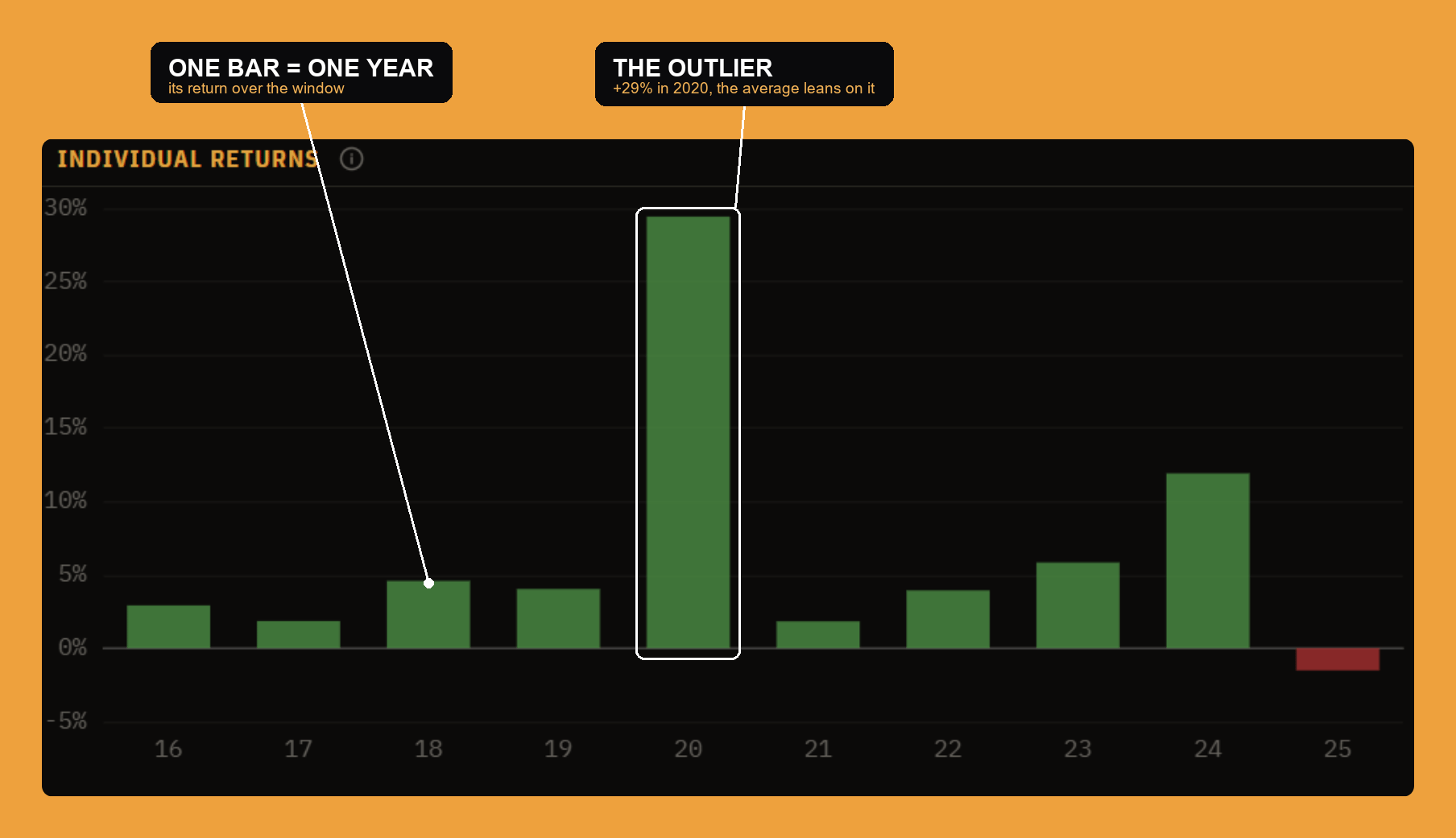
Individual returns plots one bar per sampled year, each the year's return over the selected window. This is the consistency check the average cannot give you. A wall of green bars is a real pattern; a flat field with one enormous spike (the tall 2020 bar in the example) is one lucky year wearing a good average's clothes.
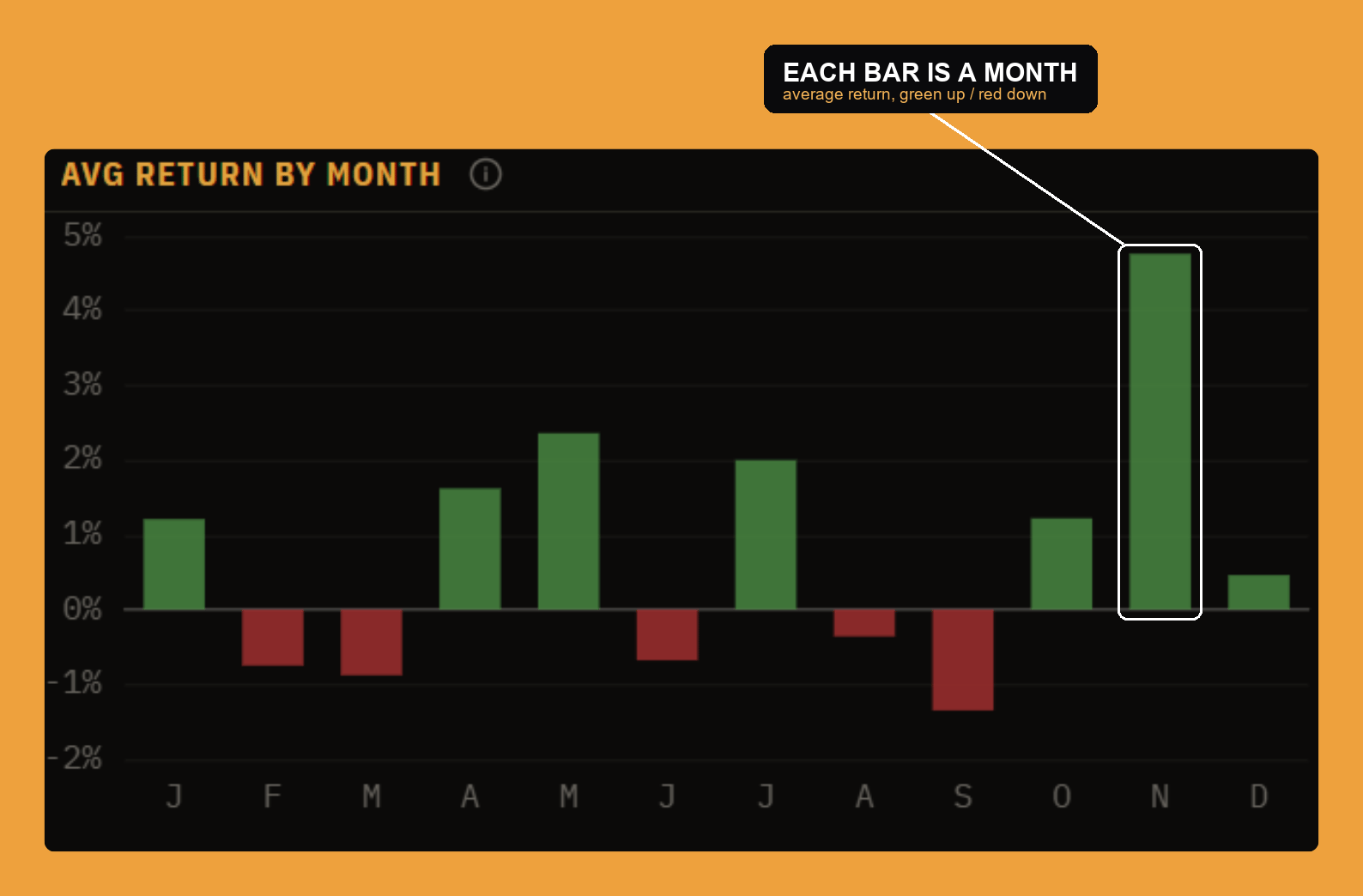
Avg return by month is the mean return for each calendar month (Jan to Dec) across the sampled years. Each year's within-month move is compounded, then averaged across the years, and hovering a bar shows the up/down split and hit rate. This chart (and the weekday one) reads the whole sampled history by the calendar, independent of the window you have drawn, so it is the map you use to decide where to draw the window in the first place.
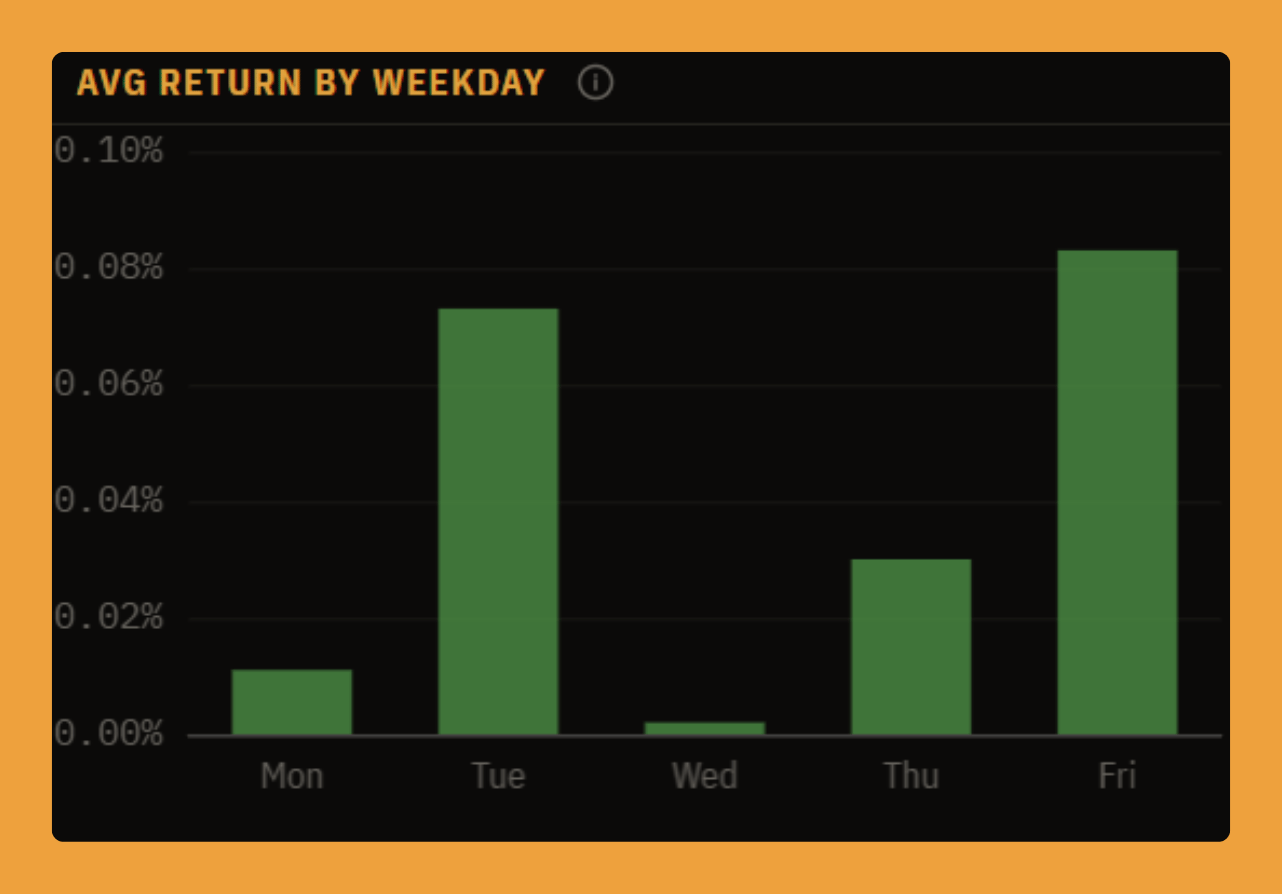
Avg return by weekday is the average one-day return by weekday, Monday to Friday, across the sampled years. It is the finest-grained seasonal cut, useful for timing an entry within a week more than for a thesis.
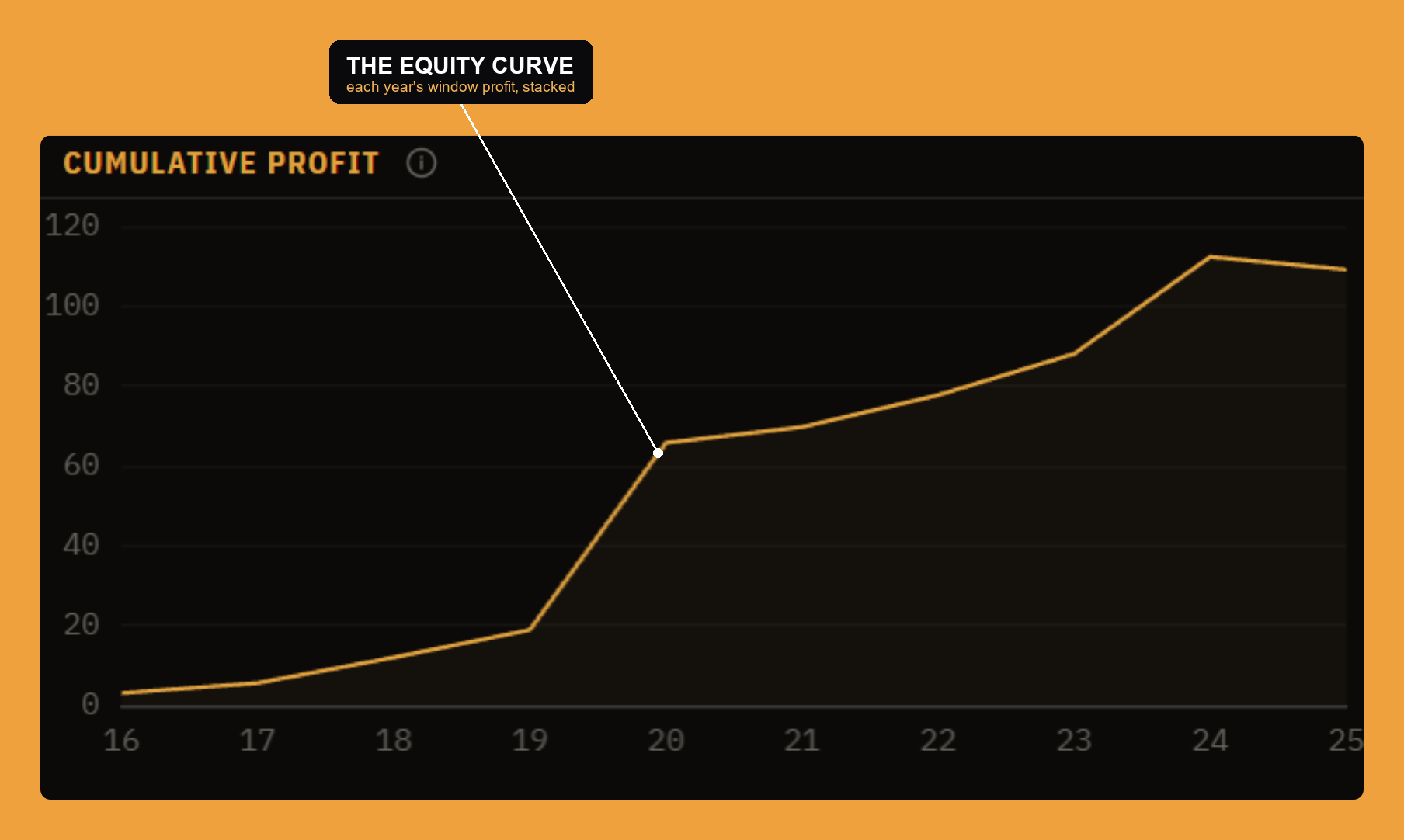
Cumulative profit is the running sum, year by year in time order, of each sampled year's profit over the window, in price points. It is the equity curve of taking this one seasonal trade once every year: a steady climb is a dependable pattern, a staircase that stalls for years tells you the edge comes and goes.
The per-year breakdown
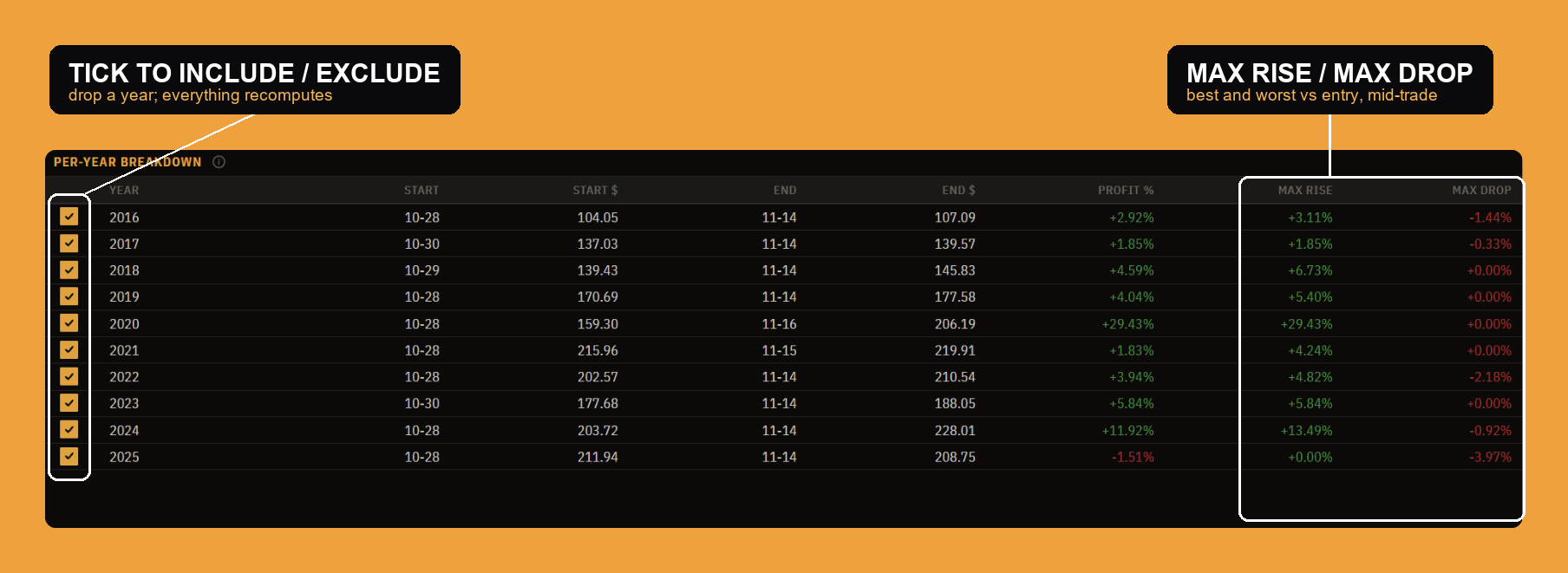
The table is the receipts behind every number above, one row per candidate year:
- Year is the year sampled.
- Start and Start $ are the actual entry date (the first session on or after your start date) and the price paid.
- End and End $ are the exit date and the price sold.
- Profit % is that year's return over the window.
- Max rise is the best close the trade reached versus entry, the most you were ever up during the hold.
- Max drop is the worst close versus entry, the deepest dip you sat through.
The tick box on the left includes or excludes that year from the entire study. Click a row (or the box) to toggle it: excluded rows stay visible but dimmed, and every stat and chart above recomputes on the remaining years. It is the same include/exclude the Years control drives, put right next to the evidence, so you can drop a distorting year (a 2020, a one-off merger) and see instantly whether the pattern survives without it.
Events mode
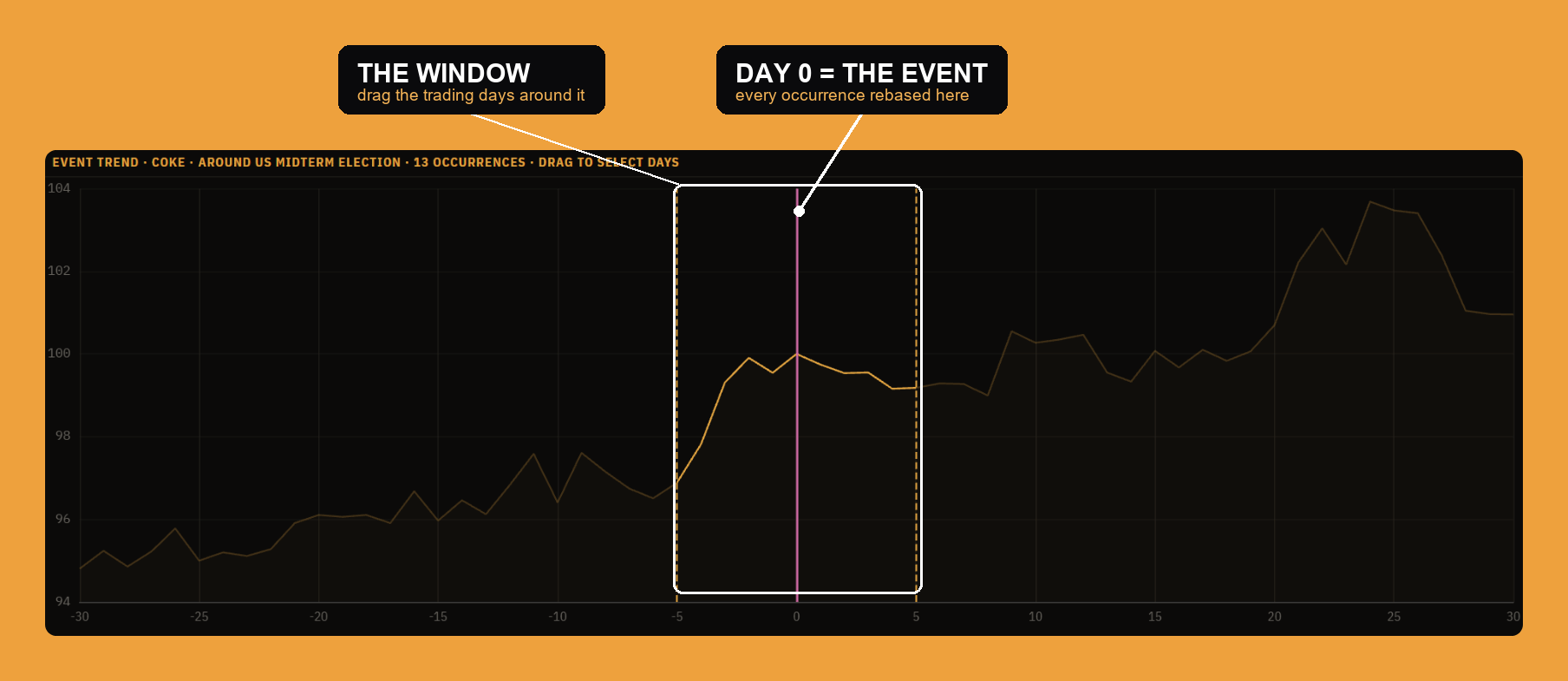
Events mode asks a different seasonal question: not "what does the stock do in November?" but "what does the stock do around this recurring event?" Pick an event from the catalog (categories to events: Fed decisions, CPI releases, elections, and more) and the study rebases to each past occurrence instead of to the calendar.
- The axis is relative trading days around the event. The solid vertical line is day 0, the event's first session; negative days are before it, positive days after. Each occurrence is rebased to 100 at its day-0 close and averaged in log space, exactly like the calendar curve.
- Days sets how many trading days before and after day 0 to show, symmetric so the event stays centered.
- The window is a relative-day range. Drag it on the curve (or read it in the filter bar, for example day 0 to +5). Each occurrence becomes a trade from the window's first day to its last, fed through the same stat engine, so win rate, annualized return, volatility and the rest all mean what they mean everywhere else in the panel.
- The title's occurrence count ("13 occurrences" in the example) is how many past instances fell inside the symbol's price history and the current lookback.
- Split appears when the event carries an outcome (a hike versus a cut) or a value. It divides the occurrences into two buckets and overlays both curves with a side-by-side comparison, so you can see whether the reaction depends on the outcome rather than just averaging over both.
The example reads "Event trend · COKE · around US midterm election · 13 occurrences," with the window set to day −5 through +5 around the vote.
Intramonth mode
Intramonth re-pivots the same engine from a year cycle to a month cycle. The alignment axis becomes day-of-month (1 to 31), and every month in the lookback is one trade, so the curve is the average path within a month.
- Month focuses a single calendar month, or All months blended. It defaults to the current month, so the panel opens on "this month versus its own history."
- Days is the day-of-month window. Drag it on the curve; "1 to 31" is a whole-month hold, and an end day past the month's length rolls into the next month.
Everything else, the stat board, the per-month table, cumulative profit, behaves exactly as in the calendar view, with "year" simply replaced by "month."
Settings
Like the other research panels, Seasonality Analysis is configurable from the gear in the top-right (or by right-clicking the window). The settings open as three tabs.
- Columns manages the Per-year breakdown table. A search box and two lists, Available and Visible, let you drag to show, hide, or reorder the columns: Year, Start, Start $, End, End $, Profit %, Max rise and Max drop. In Events mode this is the per-occurrence table, in Intramonth the per-month table.
- Display is the show/hide list for every widget: the seasonal curve, each of the six stat cards (Summary, Return, Profit, Trades, Outcomes, Risk), the month, weekday and cumulative-profit charts, individual returns, and the per-year breakdown. Each has a Hidden / Shown toggle, so you can strip the panel down to just the pieces you use. Every widget is also draggable and resizable once the workspace is unlocked, and the arrangement persists per window.
- Text sets the type for the tables: the font family, the size in pixels (the headers and filters scale with it), and the style (Regular or Bold, Upright or Italic). A live preview shows the result, and Reset text restores the default.
The bottom line
Seasonality Analysis turns "the calendar seems to favor this" into a measured trade. The curve is many years of one instrument rebased and geometrically averaged onto a single year; a window you draw becomes one trade per year; the stat board reports how often it worked, how much it made, and how much it hurt; the charts and the per-year table show whether the average is a real, consistent pattern or one lucky outlier; and the Events and Intramonth modes ask the same question of a recurring event or the day-of-month cycle. It is one screen for the oldest question in trading, "has this happened before, and how often did it pay?"